Kubernetes v1.36: PSI Metrics Achieve General Availability – A Look Under the Hood
Beyond Utilization: Why PSI Matters
Traditional monitoring metrics, such as CPU and memory utilization percentages, often paint an incomplete picture of system health. A node might report only 70% CPU usage while critical tasks experience noticeable latency due to scheduling delays or memory pressure. This is where Pressure Stall Information (PSI) steps in. Introduced in the Linux kernel in 2018, PSI offers high-fidelity signals that reveal resource saturation before it escalates into an outage. Instead of just showing usage, PSI tracks the time tasks spend stalled waiting for CPU, memory, or I/O resources, packaging that data into easy-to-understand percentages over specified windows.
Cumulative Totals and Moving Averages
PSI provides two key types of data: cumulative totals of stalled time and moving averages over 10-, 60-, and 300-second windows. This dual approach helps operators distinguish between transient spikes and sustained resource contention. For example, a short burst of I/O wait might be harmless, but a consistent 30% stall over five minutes signals a deeper issue. With Kubernetes v1.36, these metrics are now stable and available at node, pod, and container levels, giving teams a granular view of performance bottlenecks.
Proving Stability: Performance Testing at Scale
When promoting a telemetry feature to GA, a common concern is the resource overhead required to collect and serve the metrics. To address this, the SIG Node community conducted extensive performance validation on high-density workloads (80+ pods) across various machine types. Testing focused on two primary scenarios to isolate the impact of the kubelet and the kernel itself.
Scenario 1: The Kubelet Overhead
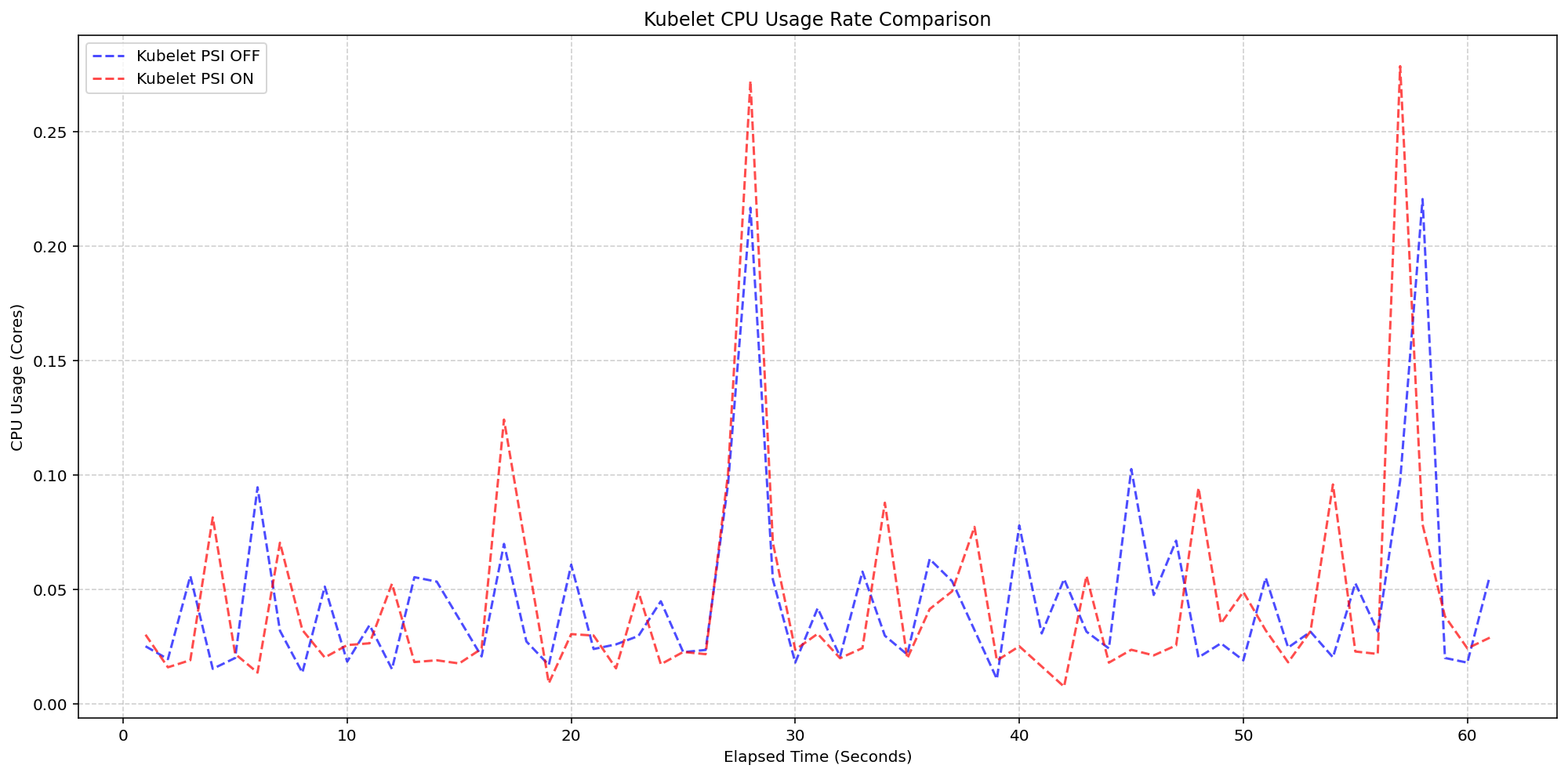
The first test measured the overhead of the kubelet actively querying PSI metrics. Using 4-core machines where the kernel already had PSI enabled (psi=1), the team compared clusters with the KubeletPSI feature gate turned on versus off. The results showed that kubelet CPU usage was practically identical in both magnitude and frequency, with the collection logic blending seamlessly into normal housekeeping cycles. The additional overhead remained within 0.1 cores, or about 2.5% of total node capacity, confirming that the feature is lightweight and safe for production-scale deployments.
System CPU usage followed a similar pattern. When comparing the Kubelet PSI-enabled cluster (red) to the disabled cluster (blue), the lines overlapped closely, with only a slight expected increase due to the overhead of reading cgroup metrics. Once the OS is tracking PSI—typically around 2.5 cores in these tests—the act of Kubernetes consuming that data is negligible.
Scenario 2: Kernel Overhead
The second scenario compared clusters with kernel PSI turned off versus on, while keeping the kubelet feature enabled. This isolated the cost of the kernel's own pressure tracking. The results mirrored those of the first scenario: the additional CPU cost of enabling kernel PSI was minimal, especially on modern hardware. The conclusion is clear: both the kernel and kubelet components are highly efficient, making PSI metrics production-ready without compromising node performance.
With these validations, Kubernetes v1.36 graduates PSI metrics to GA, giving operators a reliable, real-time window into resource contention. Whether you're debugging latency spikes or capacity planning, PSI provides the early warnings needed to keep systems healthy. To get started, enable the KubeletPSI feature gate (already on by default in v1.36) and explore the new metrics via the /metrics endpoint or your favorite monitoring stack.